All apps and solutions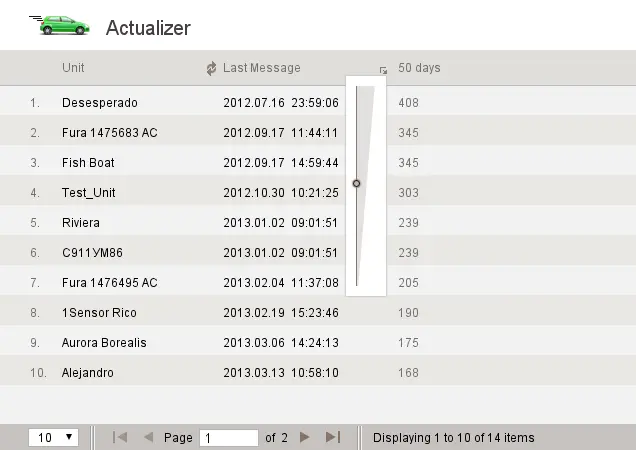 See the demonstration
JAXICLOUD FLEET MANAGEMENT
Actualizer
Find devices with missing or outdated communications so faults can be investigated.
Discuss your needsJAXICLOUD FLEET MANAGEMENT
FUNCTIONS
What you can use it for
Identify devices for inspection
Follow up on connectivity and power
JAXICLOUD FLEET MANAGEMENT
See how the app works
Explore real app views and follow the functions step by step. The examples show an illustrative configuration; your account may look different.
JAXICLOUD FLEET MANAGEMENT
GUIDED IMAGE WALKTHROUGH
App views explained
- Filter by days without data
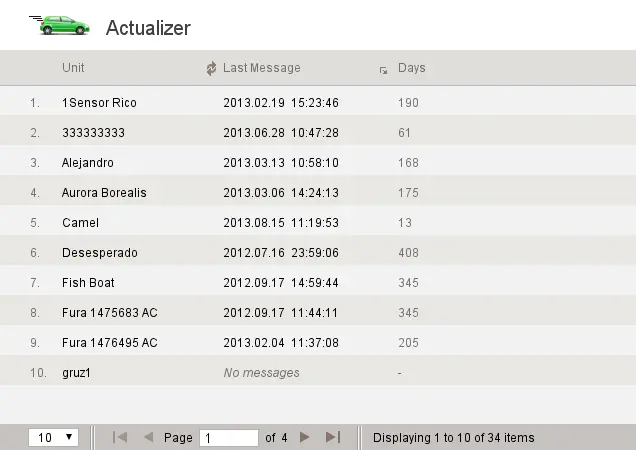
- Sort units for inspection
JAXICLOUD FLEET MANAGEMENT
JAXICLOUD FLEET MANAGEMENT
Detailed functions
Get more from the app
Latest message for each unit
Last known position and geofence
Filter by days without data
Sort units for inspection
This is an existing app that is no longer developed or maintained by its platform supplier. We check availability and suitability before configuring it for your fleet.
IN PRACTICE
From data to action
A tracker stops reporting. The office checks its last message and location to prioritise checks of power, connectivity or equipment.
Functions depend on your agreement, compatible equipment, data access and configuration. JAXICLOUD FLEET MANAGEMENT helps select and configure the solution.
01Choose the data
02Review the workflow
03Follow up