All apps and solutions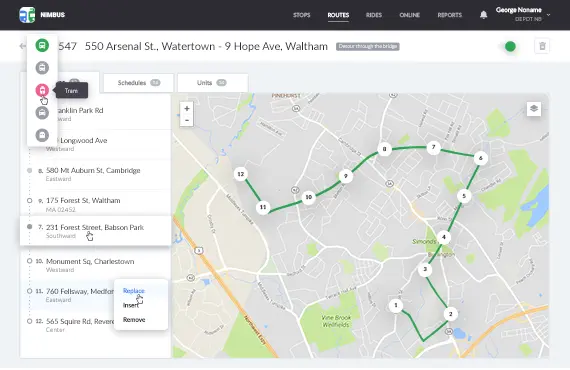 See the demonstration
JAXICLOUD FLEET MANAGEMENT
NimBus
Bring together routes, stops and vehicles to monitor public transport.
Discuss your needsJAXICLOUD FLEET MANAGEMENT
FUNCTIONS
What you can use it for
Monitor vehicles
Review deviations from the schedule
JAXICLOUD FLEET MANAGEMENT
See how the app works
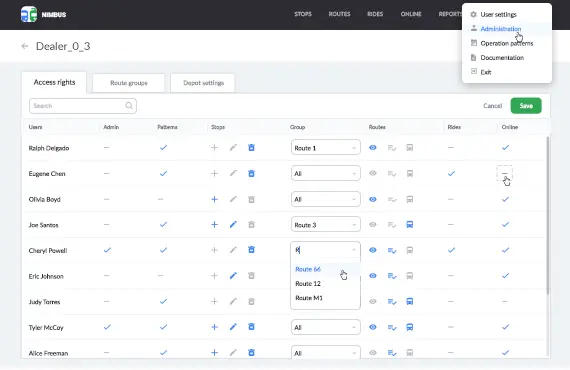
Explore real app views and follow the functions step by step. The examples show an illustrative configuration; your account may look different.
JAXICLOUD FLEET MANAGEMENT
JAXICLOUD FLEET MANAGEMENT
GUIDED IMAGE WALKTHROUGH
App views explained
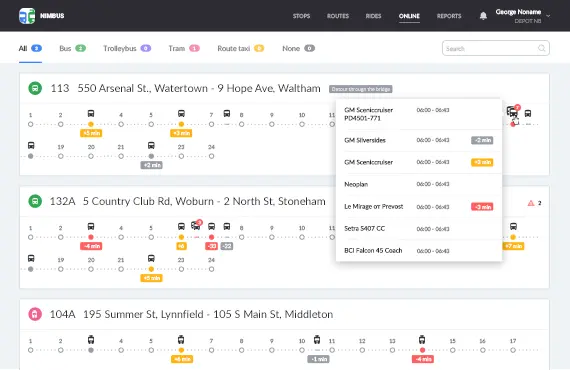
- Monitor early and late arrivals
JAXICLOUD FLEET MANAGEMENT
JAXICLOUD FLEET MANAGEMENT
JAXICLOUD FLEET MANAGEMENT
Detailed functions
Get more from the app
Create and import stops
Routes, schedules and vehicle assignment
Plan upcoming departures
Monitor early and late arrivals
The app remains supported in maintenance mode; new features are not planned. We review the available functions with your fleet.
IN PRACTICE
From data to action
A bus is delayed. The operations manager compares its progress with the route and schedule and monitors the remaining stops.
Functions depend on your agreement, compatible equipment, data access and configuration. JAXICLOUD FLEET MANAGEMENT helps select and configure the solution.
01Choose the data
02Review the workflow
03Follow up