JAXICLOUD FLEET MANAGEMENT
JAXICLOUD Hosting · Mobile app
Guides directly on JAXICLOUD Fleet Management
Features and menus depend on permissions, hardware and your agreement. Images are examples from the documented interface.
Choose the right app
Hosting and Platform mobile apps are different. Use the app and server or account specified by JAXICLOUD. Log in with your personal user; menus and devices follow your permissions.
Visibility on the go
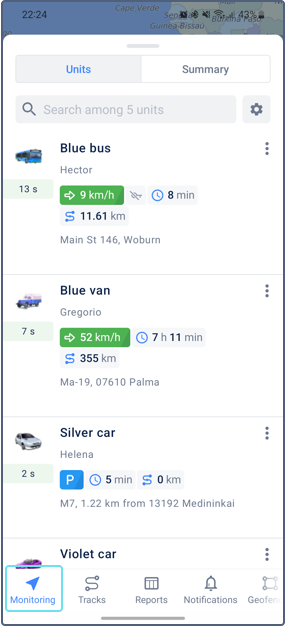
Open device list and map, select a vehicle and check recent data. Hosting also provides tracks, history, reports and geofences. The Platform app focuses on location, telemetry and push notifications.
Phone settings
Allow required notifications and phone features. The Hosting Android guide specifies Android 9 or later. App language follows phone or app settings; available languages may vary.
If data is missing
Check internet, selected account, device list and last communication. Compare with the web version. Send app name, phone model, time and screenshot to JAXICLOUD Support; never share passwords.
Contact JAXICLOUD Support
Include platform, vehicle or device, time and a description. Send a screenshot to support@jaxicloud.com if possible.
Contact JAXICLOUD Support →